
Free WordPress Plugin
Log known AI and LLM crawlers visiting your WordPress site. No ads, no bloat, no tracking of real visitors.
- Privacy-first (local storage, no third-party requests)
- Lightweight (simple dashboard, clear logs)
- Useful (recent hits 7-day + 30-day summary)
- Install via WordPress.org (recommended) or download the ZIP
Built in-house at OtterFixer by Olivia 🦦

Quick Summary
See which AI bots request your pages, without tracking humans.
TRACKS
AI bots only
STORES
Locally
BEST FOR
Owners & devs
SETUP
Minutes
What this plugin does
Instead of guessing, you get a clear record of known AI crawlers that hit your site.
Bot detection
Detects known AI and LLM crawlers by user agent.
Page logging
See which URLs were requested and when.
Simple reporting
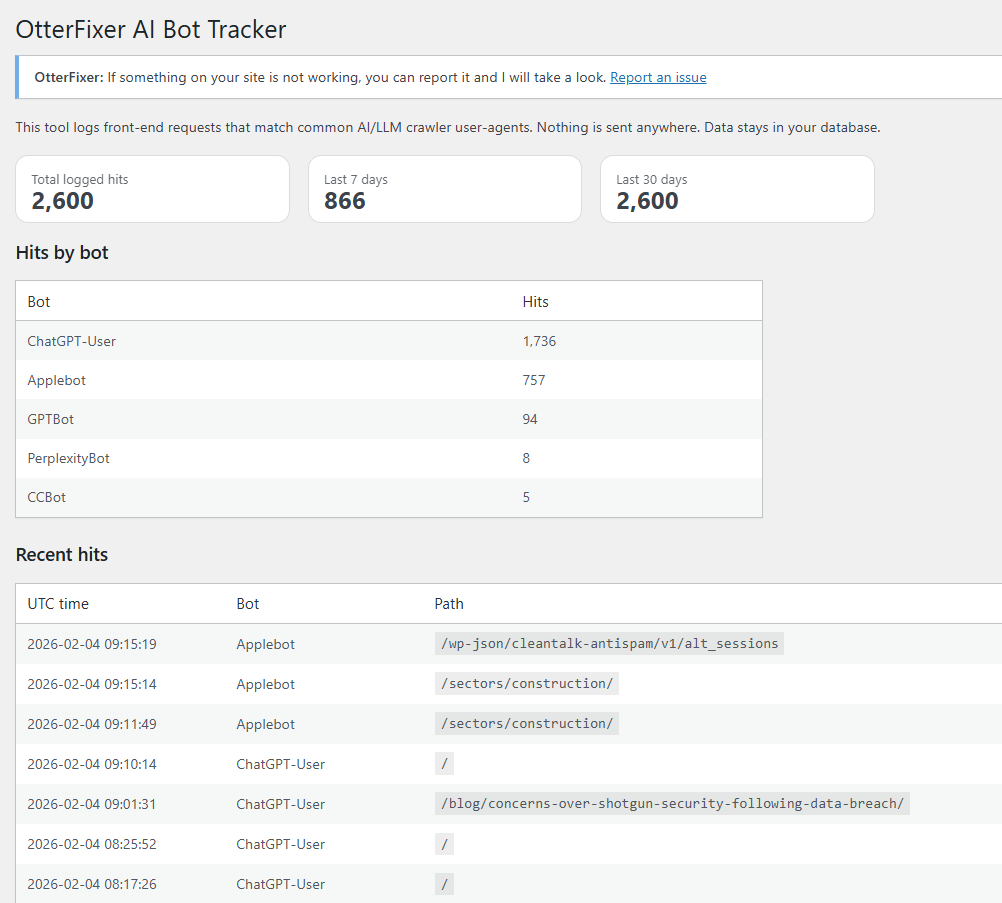
Recent hits plus quick 7 and 30 day summaries.
Share
Copy a clean summary for notes or reports.
Why it’s useful
- Understand which AI bots are visiting your site
- See which pages are being requested
- Get clarity without installing heavy analytics tools
- Keep everything local and private
“See which AI bots are crawling your WordPress site, without tracking real visitors or sending data anywhere.”
OtterFixer, lightweight, privacy-first tools
How to install the plugin
Follow these steps for a quick setup.
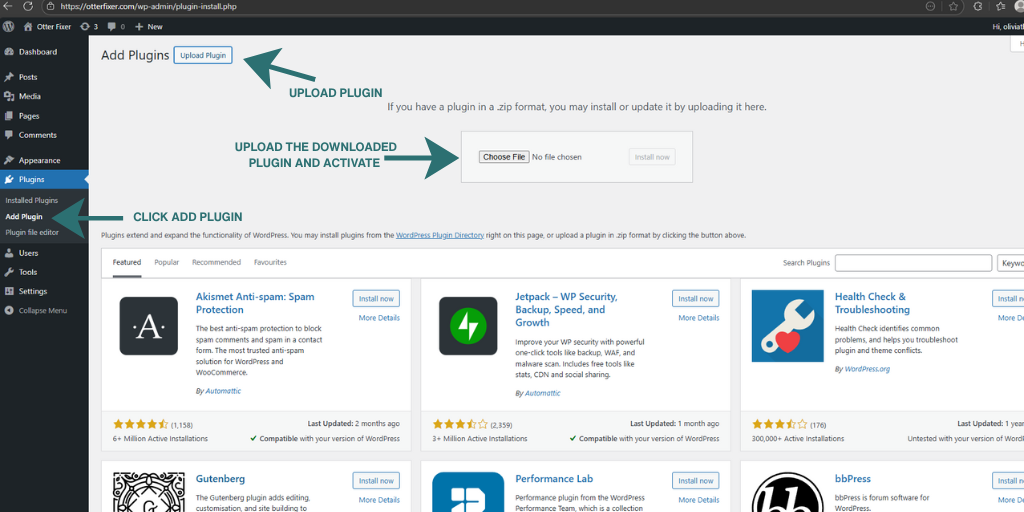
Upload the plugin ZIP via Plugins → Add New → Upload Plugin, then activate it like any normal WordPress plugin.
- Download the plugin ZIP file
- Go to Plugins → Add New → Upload Plugin
- Upload the ZIP and activate
- Open Tools → OtterFixer AI Bot Tracker
Where to find it
After activation, you’ll find the AI Bot Tracker screen here:
Tools → OtterFixer AI Bot Tracker
What you’ll see after activation
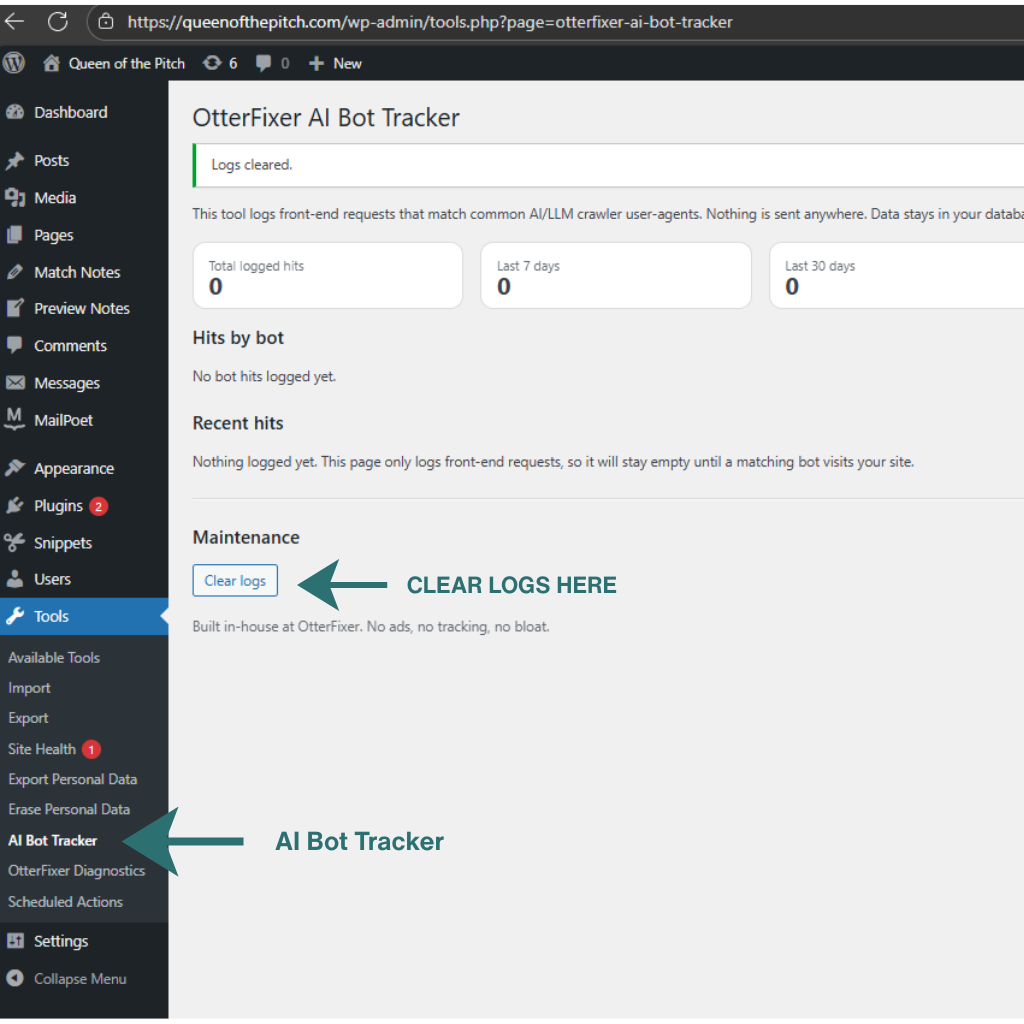
After activation, open Tools → OtterFixer AI Bot Tracker to view a summary of AI bot activity and recent bot hits.
Who this plugin helps
Great for site owners, developers and support teams who want insight into AI crawler activity without adding tracking or complexity.
Privacy and data handling
OtterFixer AI Bot Tracker does not track human visitors, does not send data to third parties, and does not make external network requests.
All data is stored locally in your WordPress database and is only used to display AI bot activity inside the WordPress admin area.
Download
No tracking. Local only. No email.
This plugin is officially approved and hosted on WordPress.org.
Installing via WordPress.org ensures automatic updates and compatibility checks
Prefer a manual install?
Privacy-first, lightweight, and fully local.
OtterFixer AI Bot Tracker only logs known AI bot requests and stores the data inside your WordPress database.
Frequently Asked Questions
Does this plugin block AI bots?
No. OtterFixer AI Bot Tracker is a tracking tool only. It helps you see AI bot activity on your site, but it does not block or interfere with any requests.
Does it track normal visitors?
No. The plugin only logs requests that match known AI and LLM bot user agents. Normal visitors are not tracked or stored.
How long are logs kept?
By default, logs are stored for 30 days. You can change the retention period in the plugin settings if you want to keep data for a shorter or longer time.
Why am I not seeing any bot hits?
This usually means no known AI bots have visited your site yet. It can also happen if your caching layer or CDN is serving pages without running WordPress.
Built in-house at OtterFixer by Olivia 🦦
Lightweight tools I use when fixing sites.