
OtterFixer Site Diagnostics is a lightweight WordPress plugin that gives you a clear snapshot of your site’s setup in one place.
It’s designed to make troubleshooting quicker, whether you’re fixing things yourself or sharing details with a developer or support team.
What this plugin does
Instead of hunting through different settings screens, OtterFixer Site Diagnostics pulls together the most useful WordPress and server information into a single, easy-to-read report.
- Core site and server settings
- WordPress, PHP, and database details
- Active theme and plugins list
- REST API and WP-Cron status checks
Why it’s useful
- Quickly spot common configuration issues
- Save time when troubleshooting problems
- Share a clean diagnostics report with support or developers
- Avoid sending screenshots or guessing settings
This is the same type of information I ask for when helping fix WordPress sites.
Where to find it
After activation, you’ll find the diagnostics screen here:
Tools → OtterFixer Diagnostics
What it doesn’t do
- No ads
- No tracking
- No data sent anywhere
- No changes made to your site
The plugin only reads information already available within WordPress and displays it for you.
Download
You can download and install the plugin like any standard WordPress plugin.
Clicking the download button will save a ZIP file you can upload to your site.
Free to use. No email required.
Need help fixing something?
This plugin helps identify issues, but doesn’t fix them automatically.
If you’re unsure what the report means, you can report the issue to OtterFixer, and I’ll take a look.
How to install the plugin
Follow these steps for a quick setup.
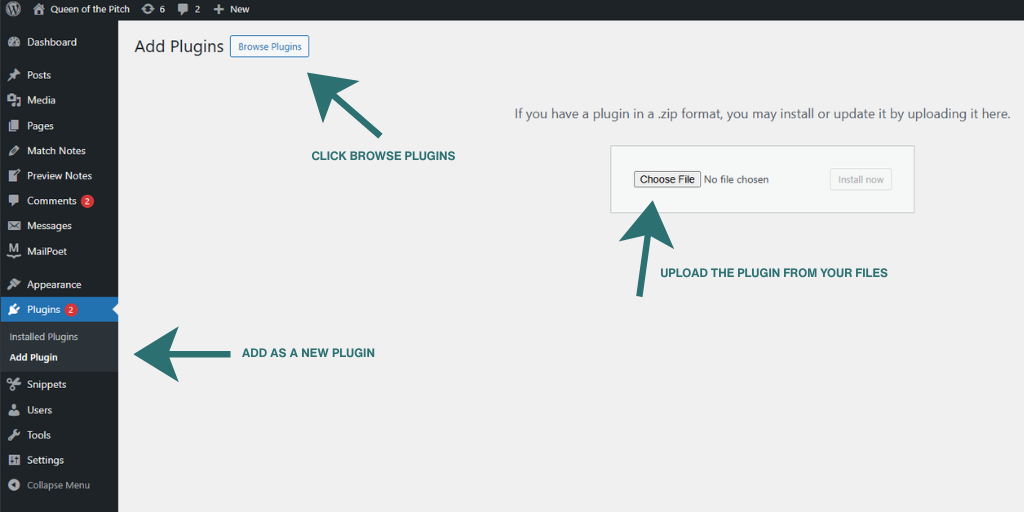
Upload the plugin ZIP via Plugins → Add New → Upload Plugin, then activate it like any normal WordPress plugin.
- Download the plugin ZIP file
- Go to Plugins → Add New → Upload Plugin
- Upload the ZIP and activate
- Open Tools → OtterFixer Diagnostics
What you’ll see after activation
Follow these steps for a quick setup.
You’ll find the diagnostics screen under Tools → OtterFixer Diagnostics once activated.
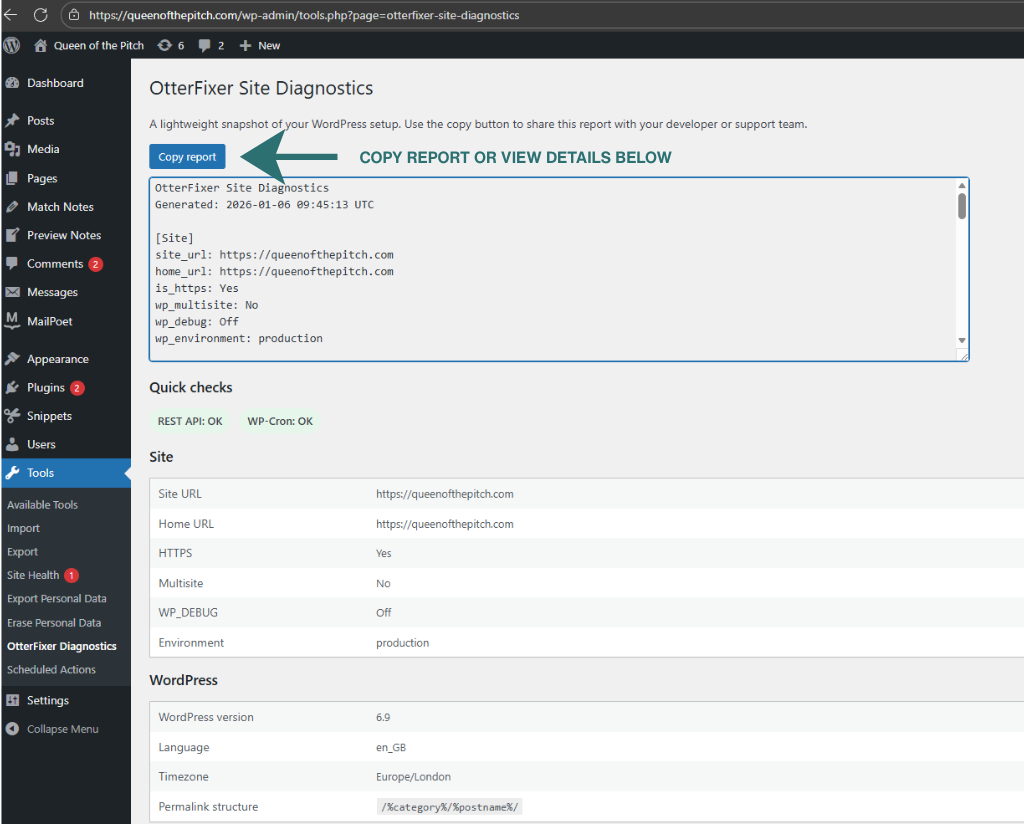
After activation, open Tools → OtterFixer Diagnostics to view a clear snapshot of your site’s setup. Use the Copy report button to share details with support or a developer.
Who this plugin helps
Great for site owners, developers and support teams who need quick site information without digging around.
Frequently Asked Questions
Do I need to enter any details?
No. All diagnostics are generated locally inside your WordPress admin area. You do not need to enter any personal or site details.
Does this plugin send data anywhere?
No. OtterFixer Site Diagnostics does not send data to OtterFixer or to any third party. Everything stays on your site.
Will this plugin change my site?
No. The plugin is read-only. It checks existing settings and information but does not modify your site or change any configuration.
Where do I find the diagnostics screen?
After activation, go to Tools → OtterFixer Diagnostics in your WordPress admin menu.
Built in-house at OtterFixer by Olivia 🦦
Lightweight, practical tools designed to fix real WordPress problems.