
Free WordPress Plugin
Organise jobs, fixes and improvements directly inside WordPress. Create tasks, track progress and keep a clear record of what needs doing without spreadsheets or external tools.
- Private and secure, data is stored locally in your database
- Lightweight and fast with a clean admin interface
- Built for site owners, freelancers and agencies
- Simple setup, ready in minutes
- Works alongside any theme or builder
Built in-house at OtterFixer by Olivia 🦦

Quick Summary
Free WordPress task management for admins, freelancers and agencies.
TRACKS
Tasks and progress
STORES
Locally
BEST FOR
Admins, maintainers and agencies
SETUP
Minutes
What this plugin does
Manage your WordPress workload without leaving the dashboard
OtterFixer Task Board adds a simple, visual task system inside wp-admin.
Create to-dos, assign priorities and keep track of completed work in one place.
Perfect for maintenance, development, SEO updates and client requests.
Visual task board
See everything that needs doing at a glance.
Quick task creation
Add notes, priorities and due dates in seconds.
Activity logging
Know what was done and when.
Fast and lightweight
No bloat, no heavy scripts.
Why it’s useful
- Keep track of fixes and improvements
- Know what needs doing next
- Avoid forgotten client requests
- Replace messy notes and spreadsheets
- Manage work without leaving WordPress
“Organise website work in one place, without extra tools or logins.”
OtterFixer, practical tools for WordPress owners
What is the OtterFixer Task Board?
OtterFixer Task Board is a WordPress plugin that lets you:
- Create and manage tasks inside WP Admin
- Group tasks by category, priority, and due date
- Save task groups as reusable templates
- Reapply templates in seconds
- Track completed work and overdue tasks
- Keep everything in one place, inside WordPress
No external dashboards.
No subscriptions.
No overcomplicated project management tools.
Who is this plugin for?
OtterFixer Task Board is ideal for:
- WordPress agencies managing multiple client sites
- Freelancers handling recurring maintenance work
- Site owners who want structure without complexity
- Developers running repeatable launch or QA checklists
- Support or maintenance teams tracking ongoing work
If you find yourself repeating the same checks again and again, this plugin will save you serious time.
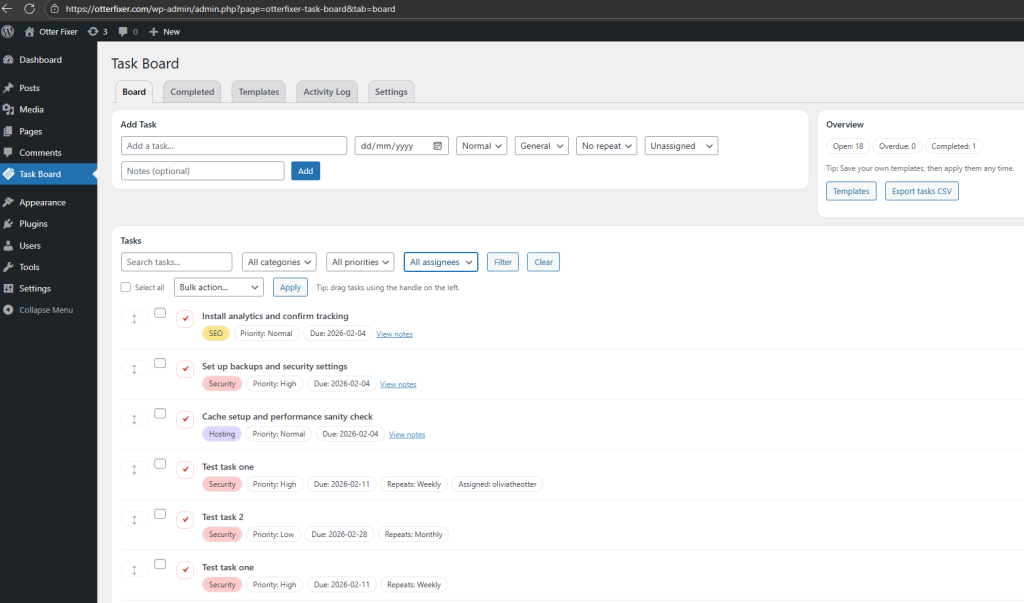
The Task Board
The Task Board is where everything lives.
You can quickly add tasks with:
- A task title
- Due date
- Category
- Priority
- Optional notes
- Optional assignee
Tasks are easy to scan, easy to reorder, and easy to filter.
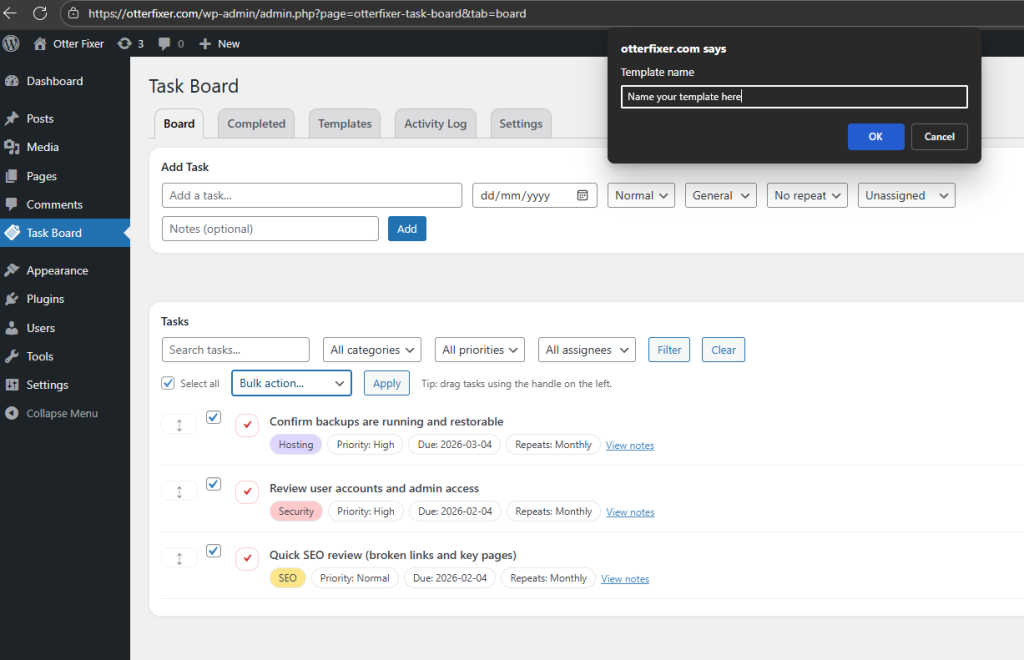
Save time with task templates
Templates are the real power feature.
Instead of recreating the same task lists every time, you can:
- Select multiple tasks
- Save them as a named template
- Reuse them whenever you need
Perfect for things like:
- Monthly website maintenance
- New site launches
- SEO audits
- Security checks
- Client onboarding
- Internal workflows
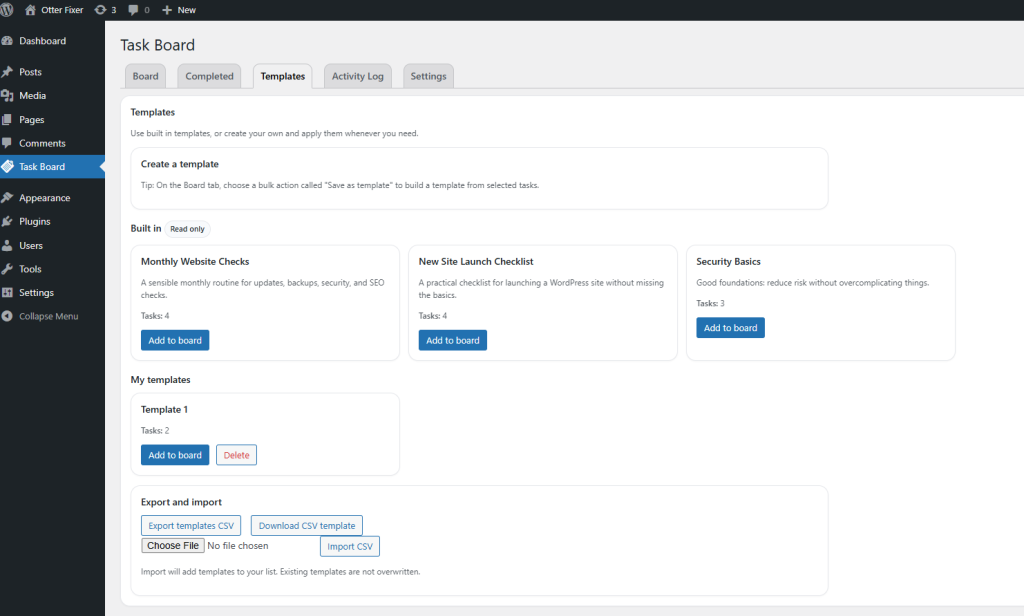
Built-in templates included
The plugin comes with ready-made templates so you can get started immediately, including:
- Monthly Website Checks
- New Site Launch Checklist
- Security Basics
These are read-only and designed as sensible starting points you can build on.
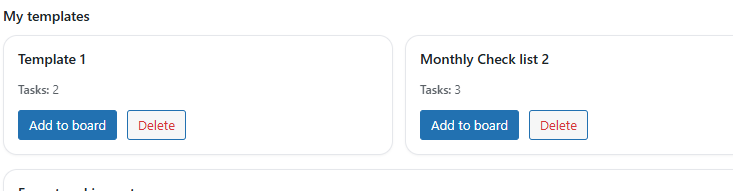
Your own templates (My Templates)
Any templates you create appear under My templates, where you can:
- Instantly add them to the board
- Reuse them across tasks
- Delete templates you no longer need
This makes scaling your workflow incredibly easy.
CSV import and export
OtterFixer Task Board includes full CSV support.
You can:
- Export your templates to CSV
- Download a ready-made CSV template
- Import templates back into the plugin
This is ideal if you manage multiple sites, want backups, or prefer working offline.

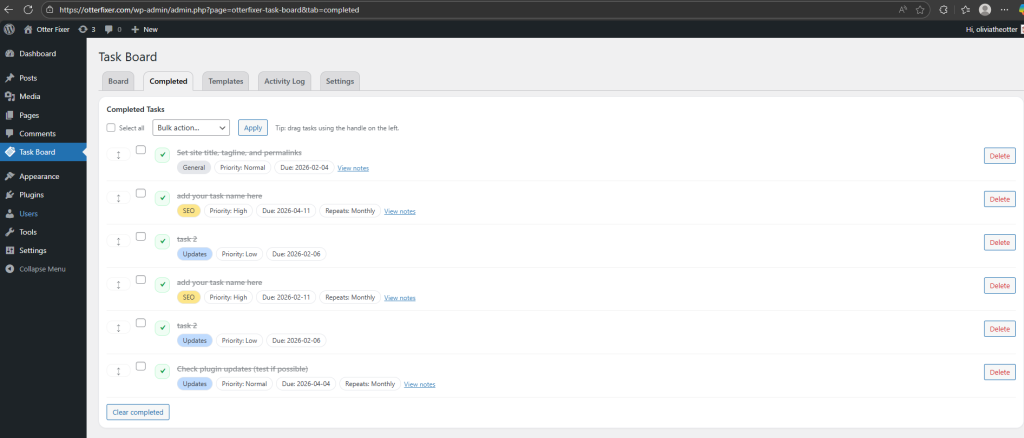
Completed tasks view
Completed tasks are kept separate so your main board stays clean and focused.
You can still review what’s been done without cluttering your active tasks.
Activity log
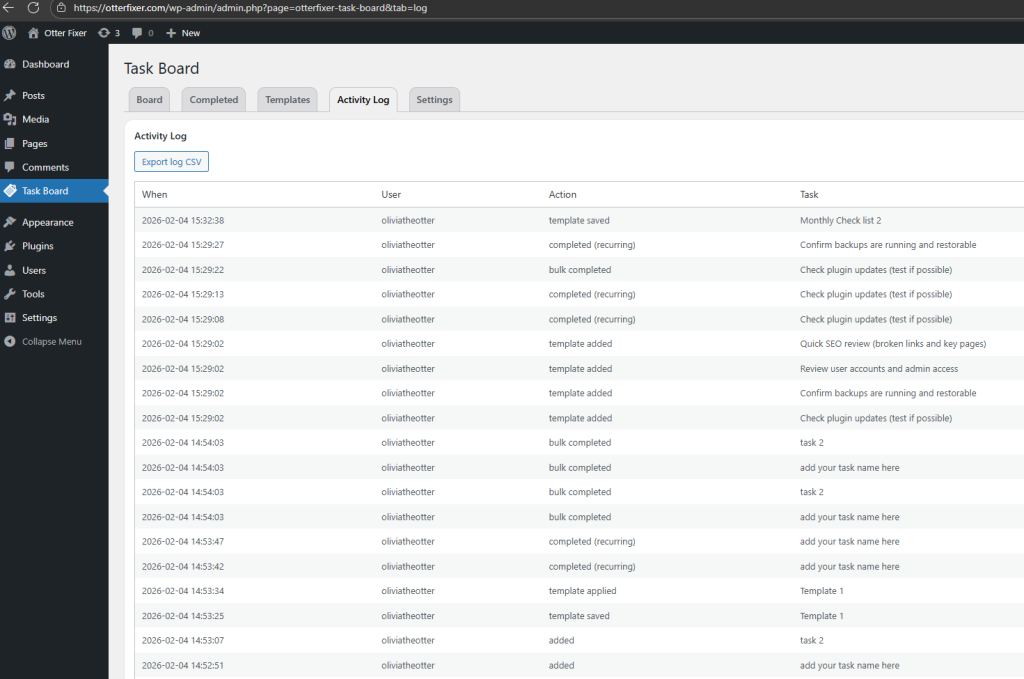
The Activity Log provides visibility into what’s happening on the task board.
It records key actions such as:
- Task creation
- Template usage
- Important changes
Useful for teams, shared boards, or anyone who wants accountability.
Flexible settings
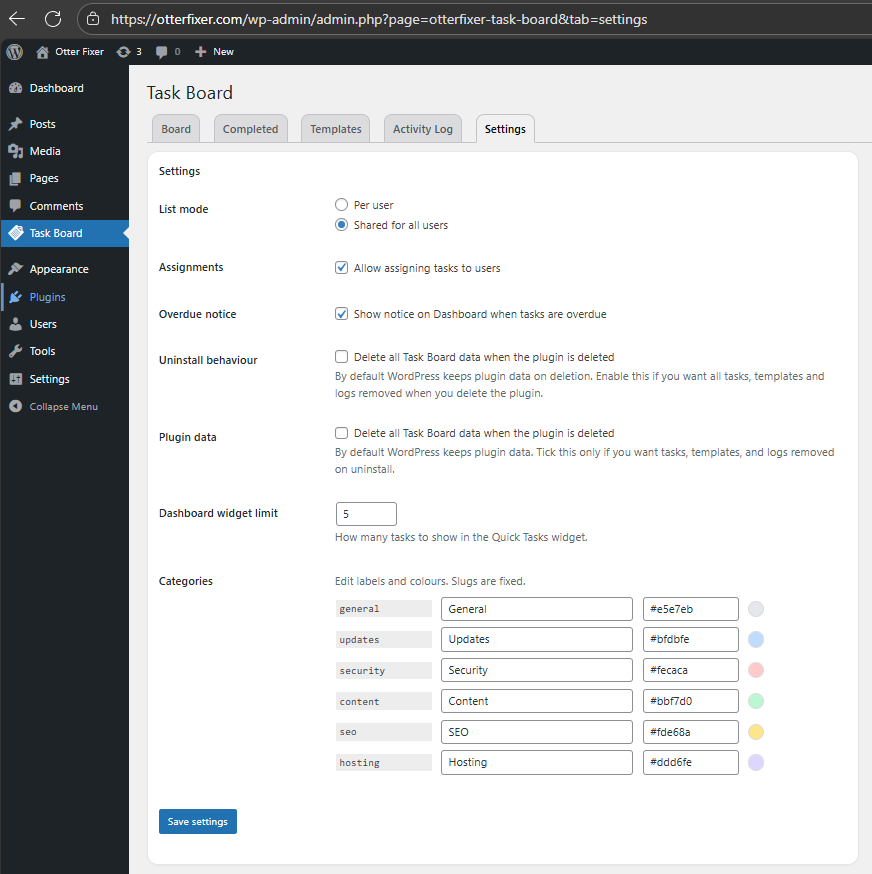
You can customise how the plugin behaves to match your workflow:
- Per-user task boards or shared for all users
- Optional task assignments
- Dashboard overdue notices
- Custom categories and colours
- Optional full data removal when uninstalling
You stay in control of how much (or how little) structure you want.
How it works (quick overview)
Add tasks
Create tasks directly on the Task Board.
Save templates
Select tasks and save them as reusable templates.
Reuse templates
Apply templates to the board in seconds.
Repeat with confidence
Run consistent checks across sites without forgetting anything.
Why OtterFixer Task Board?
- Built specifically for WordPress
- Lives inside WP Admin
- No third-party platforms
- No recurring fees
- Lightweight and fast
- Designed for real-world maintenance workflows
It’s simple enough to use daily, but powerful enough to scale with your work.
Final note
If you manage WordPress sites professionally, templates alone will save you hours every month.
Set them up once, reuse them forever.
Frequently Asked Questions
Who can use the task board?
By default, the task board is designed for WordPress administrators. This ensures your internal workflow and notes stay private.
Does this replace project management software?
No. OtterFixer Task Board is built for quick, practical website tasks. It is ideal for fixes, reminders and small improvements directly inside WordPress.
Where is the data stored?
All tasks and activity logs are stored locally in your WordPress database. Nothing is sent to external services.
Can I change task dates or formats?
Yes. The plugin includes date format options so you can match your regional or company preference.
Will this slow down my website?
No. The plugin runs only inside the WordPress admin area and is built to be lightweight with minimal overhead.
Is it compatible with my theme or builder?
Yes. OtterFixer Task Board works independently of your theme and is compatible with builders such as Elementor, Gutenberg and others.
Built in-house at OtterFixer by Olivia 🦦
Lightweight tools I use when fixing sites.